
FACEIT map veto: what to ban and what to pick
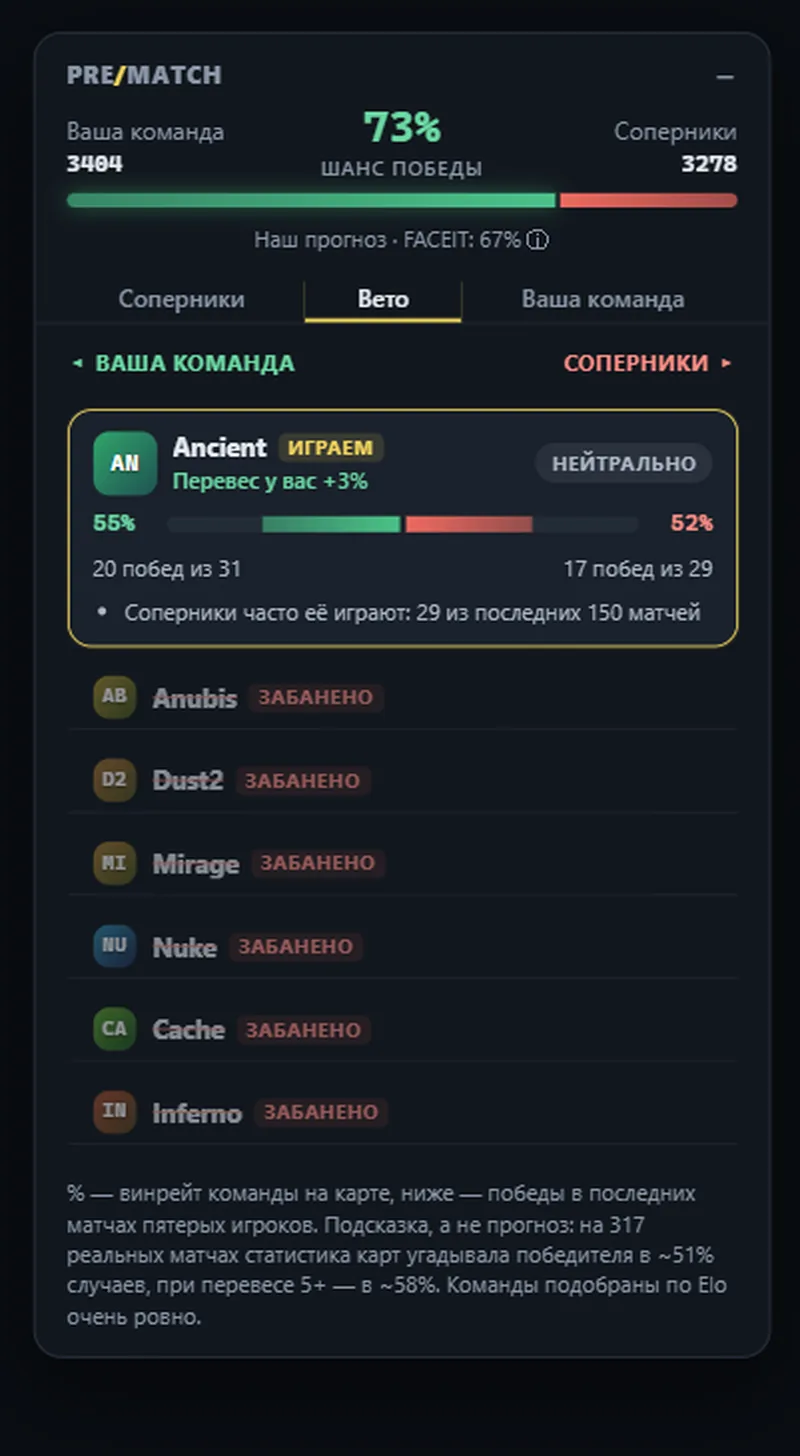
Ban maps where the opponents are clearly stronger than you and keep the one where your five has more wins over more games, always comparing both teams: a strong map for you can be even stronger for them. During the veto PreMatch writes both teams’ win rate right on FACEIT’s map rows and marks what to ban and what to keep. It is a hint, not a forecast: FACEIT matches teams by Elo very evenly.
📲 Send to another PC / remind me via Telegram
The extension installs in a desktop browser. The bot will send you the link and remind you tonight.
How the FACEIT veto works
In a regular 5v5 match the map is chosen by bans: the team captains take turns removing maps from the pool until one is left. The other players see the veto and can suggest a ban in chat. Each ban has only a few seconds, so agree on a plan early.
What to look at
- Both teams’ win rate on the map, not only your own.
- How many games stand behind it. 70% over two games means less than 55% over thirty.
- Who barely plays the map. Two or three players with no experience on it are a weak spot, for your team or theirs.
- What the opponents played recently. They are unlikely to ban a map from their latest matches.
- The whole five. If only your captain loves a map and the other four rarely play it, it is not your map.
How PreMatch works out a team’s win rate
For each player it takes their career win rate on the map. So that three lucky games do not become 100%, the number is pulled toward the player’s win rate over their last 30 matches on all maps, harder when they have few matches on this map. A player who never played the map gets that 30-match win rate minus 3 points. The five numbers are then averaged into the team’s win rate.
The gap between your win rate and theirs is the edge. Advice appears only when the edge is 5 points or more: up to two maps to ban (where the opponents lead most) and one to keep. The panel also lists two maps the opponents will probably ban: the ones they have barely played lately or lose more often on.
How it looks on the veto
During the veto each map row on FACEIT gets a short plate between the map name and FACEIT’s ban button: “them 68 · you 41”. The first map to ban is tagged “Ban · 68%”, the next one “Ban 2”, and the map to keep gets a green “Play · 55%”. The colours are only yellow, green and grey, so nothing gets confused with FACEIT’s orange button.
The plate never covers the map name or the button. On tall map cards it sits on the side away from the name and almost fades out while you hover the card. Hovering the plate itself shows the details: each team’s win rate and recent wins on the map, for example “12 of 20 in 30 games”. When a map is banned, its plate is struck through and the advice moves to the next map. After the veto the plates step aside.
How far to trust it
We checked the tips on 317 real matches. Map stats alone picked the winner in about 51% of them, and in about 58% when the edge was 5 points or more. That is why advice appears only for a clear gap and is labelled a hint. The map is one factor among many: roles, teamwork and what you are comfortable on matter just as much. If no map has a clear edge, the panel says so and suggests picking the one your team is comfortable on.
A game plan
The Plan tab splits roles in your team from stats and, once the map is picked, names your strongest player on it and who lacks experience there. The button inserts the plan into the team chat but does not send it — you press Enter. If the team chat cannot be found, the plan is copied so you can paste it yourself. By default the plan ends with our site address; turn it off in Settings → Site address in the chat plan.
Try PreMatch for free
For Chrome, Edge, Opera, Yandex Browser and Firefox. No sign-up — it works right after install.
📲 Send to another PC / remind me via Telegram
The extension installs in a desktop browser. The bot will send you the link and remind you tonight.
All features and the FAQ are on the PreMatch FACEIT extension page.
Questions
Who bans maps on FACEIT?
The team captains, in turns. Everyone else sees the veto and can make suggestions in chat.
Are veto tips paid?
No, they are free.
Why is there no tip on any map?
The edge is under 5 points on every map. Then map stats say very little, and it is better to pick by what your team is comfortable on.
Does PreMatch ban maps by itself?
No. The extension never presses anything during the veto: the captain decides, the plates only hint.
Can I turn the plates off?
Yes: the extension window → Settings → Veto tips.
Read next
- How to see opponent stats on FACEIT before the match starts
- How to tell if a FACEIT opponent is a smurf
- Best FACEIT extensions: Repeek, FACEIT FORECAST, GRIND and PreMatch compared
Free tools: FACEIT Finder · FACEIT Elo calculator · SteamID converter
Updated: 2026-11-26