
How to see opponent stats on FACEIT before the match starts
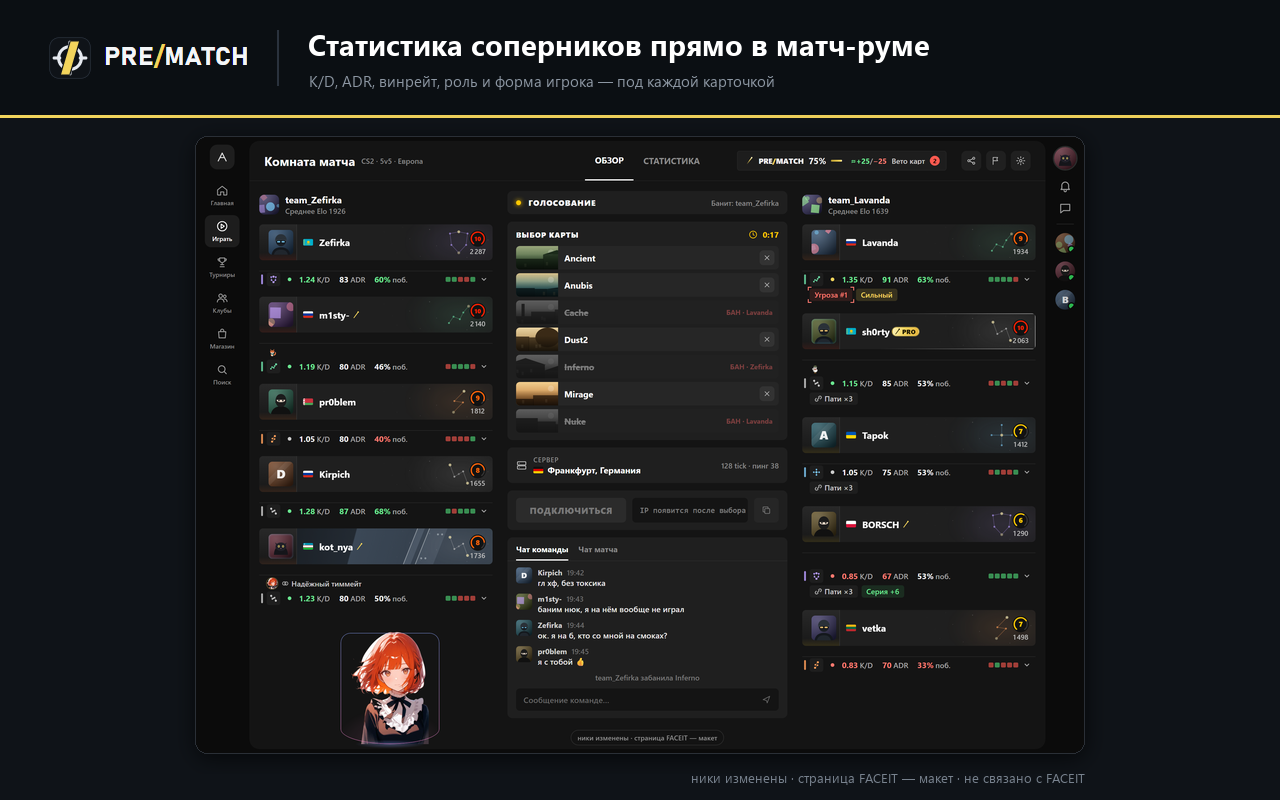
The quickest way is the free PreMatch browser extension. It adds each player’s K/D, average damage per round (ADR), win rate over the last 30 matches, last five results, role and per-map stats right under their card in the FACEIT match room. Nothing to set up: open a match on faceit.com and the numbers appear. To look up one player without installing anything, use the player check on this site.
📲 Send to another PC / remind me via Telegram
The extension installs in a desktop browser. The bot will send you the link and remind you tonight.
What you see for every player
- A line under each player card. Role, K/D, ADR and win rate over the last 30 matches, the last five games as dots, and short tags such as “On form”, “Streak”, “Ban” or “Smurf?”.
- Details on click. K/D, damage, wins and headshots over 30 games, over the last 10 and over the whole career, account age, total matches and stats on every map in the pool.
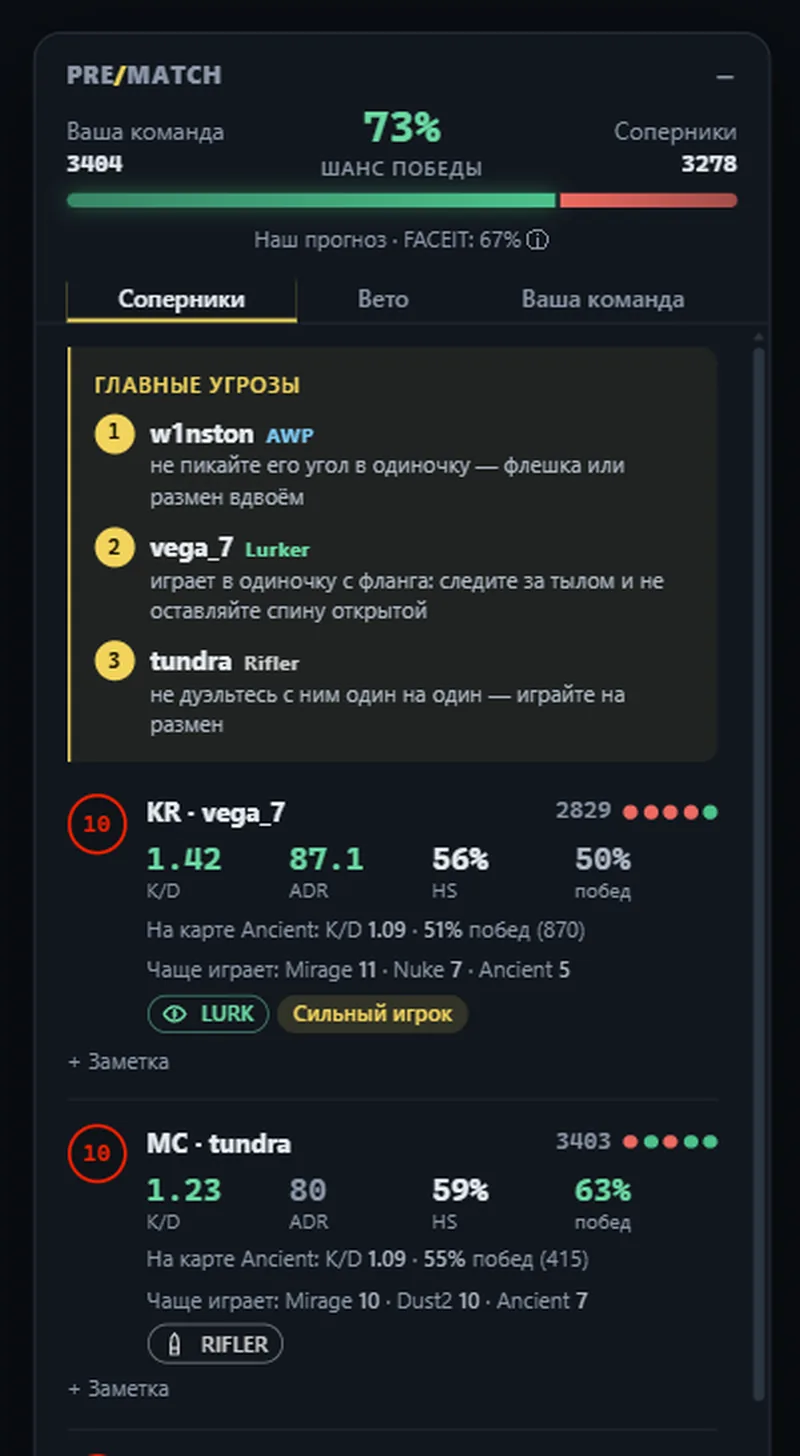
- The PRE/MATCH panel, Opponents tab. Up to three top threats with a tip on how to play them, the maps each player plays most, who queued together (a stack), who is friends with whom, and who you have met before.
- Win chance and Elo at stake. How many points you win or lose in this match.
How to read the numbers
- K/D is kills per death. 1.0 means the player kills as often as they die. Look at K/D over the last 30 matches rather than the whole career: old seasons say little about how someone plays now.
- ADR is average damage per round. It is usually 70–85, lower at the first levels. High ADR with an ordinary K/D means the player deals a lot of damage for the team even when they do not finish the kill.
- Win rate. FACEIT matches teams by Elo, so most players are near 50%. Much more than that over 30 matches means a streak, a strong premade or an account playing above its level.
- Headshots. The rate depends on the role: AWPers have a lower one, and that is normal.
- Form. “On form” appears when a player won 70% or more of the last 10 matches and that is clearly better than their last 30. “Off form” is the opposite.
So you do not have to weigh four numbers in your head, PreMatch combines K/D and damage into one rating and shows it in the details: “Dangerous player”, “Above-average player”, “Average player” or “Below-average player”. If a player has few recent matches, a note says the numbers are not reliable yet.
How the role is worked out
The role comes from the player’s whole FACEIT career and is compared with players of the same level: separately for levels 1–3, 4–7 and 8–10. We set the cut-offs on the stats of almost 2,800 players.
- AWP: at least 10% of kills with a sniper rifle, and in the top 15% of their level by that share.
- Entry: takes the first fight of the round more often than others.
- Support: many flashes, blinded enemies and utility damage.
- Lurker: often the last one alive in a clutch and rarely goes first.
- Rifler: none of the above stands out; a main rifler.
Hover the role to see why, for example “18% of kills with AWP”. A role describes a player’s habits, not what they will pick in this particular match.
How to get it
- Install PreMatch from the Chrome Web Store (Chrome, Edge, Opera, Yandex Browser) or from Firefox Add-ons.
- Open faceit.com and log in. The extension picks up your nickname to tell which team is yours.
- Find a match. The lines appear under the player cards in the match room, with details in the PRE/MATCH panel. Data takes a few seconds to load.
And without an extension?
You can open each of the nine profiles one by one and note the numbers yourself. That takes minutes, while the veto takes seconds. The extension puts it all in one place and adds what takes long to work out by hand: roles, smurf signals, FACEIT bans and a map-by-map comparison of both teams.
Limits
- The data comes from the public FACEIT Data API. If FACEIT does not answer, you see “No data” instead of numbers; reload the page in a few seconds.
- 30 matches show recent form, but also chance: one bad week moves a win rate a lot.
- A new account has few games, so its numbers are noisy. For such players the smurf signals matter more; see the smurf guide.
- Stats cannot know who slept badly, what ping someone plays on or what a premade agreed on.
Try PreMatch for free
For Chrome, Edge, Opera, Yandex Browser and Firefox. No sign-up — it works right after install.
📲 Send to another PC / remind me via Telegram
The extension installs in a desktop browser. The bot will send you the link and remind you tonight.
All features and the FAQ are on the PreMatch FACEIT extension page.
Questions
Is it free?
Yes, all opponent stats in PreMatch are free and need no account.
Can opponents see that I check their stats?
No. The extension reads public FACEIT data and shows it only to you. But if your companion is on, players who also use PreMatch see it and your frame, so they know you use the extension too.
Does it work in Edge, Opera or Yandex Browser?
Yes. They install extensions from the Chrome Web Store. Edge asks you to allow extensions from other stores first, and Opera may ask you to add its Install Chrome Extensions add-on.
Can I see the stats on a phone?
The extension runs in a desktop browser. On a phone you can look up one player by nickname with the player check.
Why is a map empty for some player?
They did not play it in their last 30 matches and have played it rarely or never on FACEIT.
Read next
- How to tell if a FACEIT opponent is a smurf
- FACEIT map veto: what to ban and what to pick
- Best FACEIT extensions: Repeek, FACEIT FORECAST, GRIND and PreMatch compared
- How to find a FACEIT account by Steam
Free tools: FACEIT Finder · FACEIT Elo calculator · SteamID converter
Updated: 2026-11-26