FACEIT ban checker: how to see a player’s bans
The fastest way is to type the nickname into the player check on this site. It shows the latest relevant ban from FACEIT data with the reason and year. The PreMatch extension marks these bans in red right in the match room, for every opponent at once.
📲 Send to another PC / remind me via Telegram
The extension installs in a desktop browser. The bot will send you the link and remind you tonight.
Which bans are shown
- Smurfing and multiple accounts: the most useful sign that a player is above their level.
- Ban evasion and platform abuse: the account has been sanctioned before.
- Cheating: only when that is the reason FACEIT itself gives.
Chat bans and leaving matches are not shown: they say nothing about how someone plays.
What the tag says
You see the most recent relevant ban: the reason in FACEIT’s own words and the year, for example “FACEIT ban: smurfing, 2025”. If the ban is still running, the tag says “FACEIT ban now”. If there are several relevant bans, it ends with the total, such as “3 in total”.
Where you can see it
- In the player check on this site: by nickname or profile link, with nothing to install, on a phone too. After a check the page address opens that player directly, so you can share it.
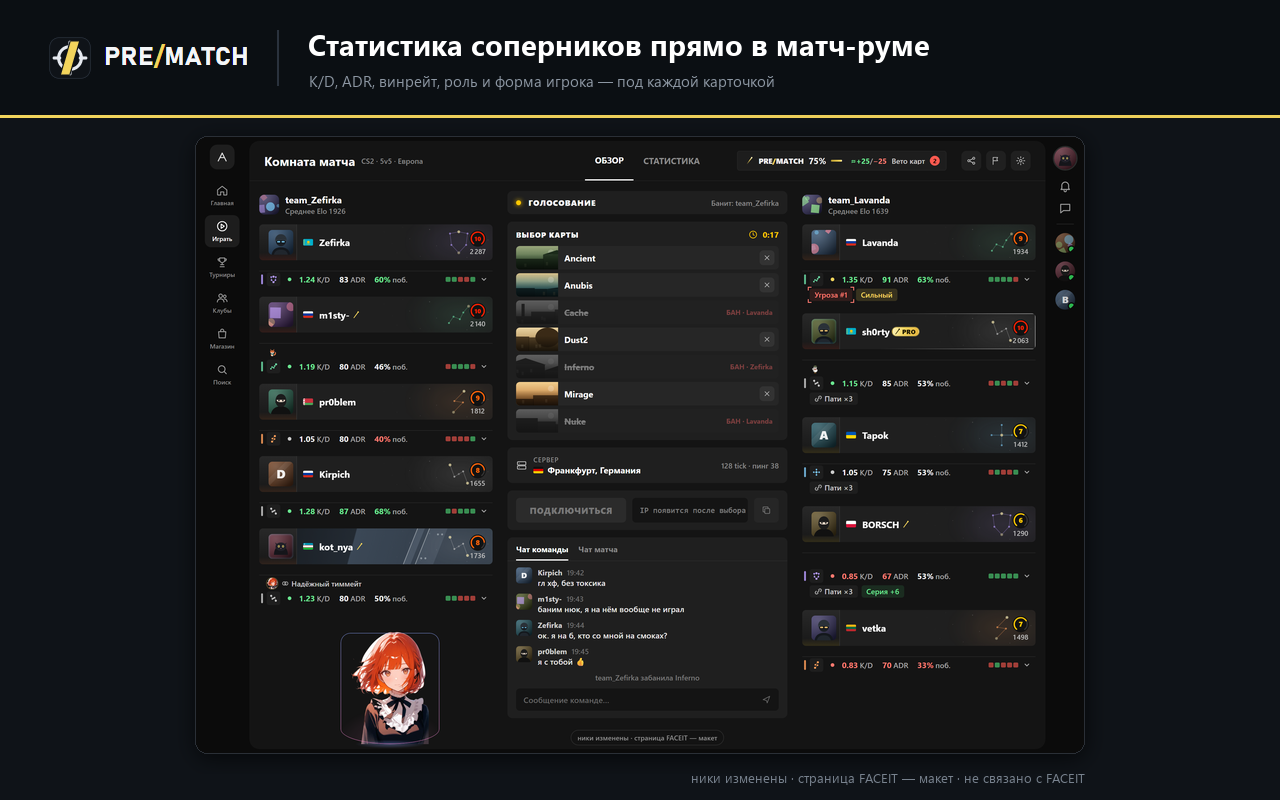
- In the match room: a red “Ban” tag under the player card, with details on click, for all nine players at once.
- On player profiles on faceit.com, with the extension installed.
How to check a player step by step
- Open the player check; it is also on the site’s home page.
- Type the nickname or paste the whole FACEIT profile link: an address like faceit.com/…/players/nickname works too.
- Two verdicts appear under the name: one on smurf signals and one on bans, either “No relevant bans” or a tag with the reason and year. Below them are Elo, K/D, ADR, win rate, form, role, best maps and ranking place.
- Copy the page address to send the result to a friend: the link opens this player directly.
How to read it
This is FACEIT’s data, not our verdict. An old ban does not mean anything is happening now, which is why the year is always shown. A smurfing ban from five years ago says more about the player having experience before this account than about what they do today. Do not call someone out in chat over an old tag. If something suspicious happens in a match, FACEIT has its own report tools for that.
What the reasons mean
- Smurfing, playing on a smurf, multiple accounts: FACEIT decided the person played on more than one account.
- Ban evasion: the account was used to get around an earlier ban.
- Platform abuse: FACEIT’s general wording for breaking the platform’s rules.
- Cheating: FACEIT itself gives cheating as the reason.
Any other reason is shown exactly as FACEIT wrote it.
A ban is not the same as the “Smurf?” flag
A ban is FACEIT’s decision. The “Smurf?” flag is our estimate from stats: few matches, a fast Elo climb, numbers above the level. A player can have both or just one. The signs are explained in the guide on how to tell if an opponent is a smurf.
The FACEIT ban list
Since summer 2025 FACEIT itself has a public Ban list section: recent platform bans with the nickname, reason, date and duration, searchable by nickname. It is a feed of the latest bans across all players, not one person’s history, and expired or overturned bans drop out of it over time. For a specific player it is quicker to check them by nickname: that also shows older relevant bans and their year.
FACEIT ban list and ban history: what you can see
The player check shows the most recent relevant ban with its reason and year, plus how many relevant bans there have been, for example “FACEIT ban: smurfing, 2025, 3 in total”. A ban that is still running says “now”. Chat bans and leaving matches are not counted. We do not list every old ban separately or show end dates: the latest ban and the total are enough to judge whether to watch out for a player.
How to see who got banned for smurfing
When FACEIT bans a smurf, it gives the Elo back to the players who lost to them and sends a notification. If the notification does not show who was banned, you can find them like this:
- Open the match history on your FACEIT profile and find the matches you got Elo back for. They are usually losses from the last few weeks.
- Open the room of such a match and look at the opponents: FACEIT usually shows a ban notice on a banned account’s profile.
- To avoid opening profiles one by one, paste the nickname or profile link into the player check: a banned player gets a tag like “FACEIT ban now: smurfing, 2026” or “…: multiple accounts”.
With PreMatch installed you do not have to look: bans are marked in red in the match room and on player profiles.
Limits
- We show only what FACEIT returns in its public data.
- Chat bans and leaving matches are hidden on purpose.
- If FACEIT does not answer in time, no tag appears, so a missing tag does not prove a clean record.
Try PreMatch for free
For Chrome, Edge, Opera, Yandex Browser and Firefox. No sign-up — it works right after install.
📲 Send to another PC / remind me via Telegram
The extension installs in a desktop browser. The bot will send you the link and remind you tonight.
All features and the FAQ are on the PreMatch FACEIT extension page.
Questions
Where is the FACEIT ban list?
In the Ban list section on the FACEIT website: a feed of recent bans with the reason and duration. For one specific player, the player check by nickname is quicker.
How can I see which player got banned when I get an Elo notification?
Open the matches you got Elo back for and check the opponents by nickname: the banned one shows “FACEIT ban now” with the reason.
How do I check if someone has a second FACEIT account?
There is no public link between accounts. You can only look for smurf signs (few matches, fast Elo climb, stats above the level) and for an earlier ban for multiple accounts, which the player check shows.
Can I check bans on a phone?
Yes, the player check works on the site with nothing to install.
Where does the data come from?
The public FACEIT Data API, the player bans section.
No tag means no bans?
It means FACEIT’s public data has no relevant bans. Chat bans and leaving matches are left out on purpose.
Is it free?
Yes, both the check on the site and the tags in the extension are free.
Will the player know I checked them?
No. The check reads public FACEIT data; the player is not notified.
Why does a player in my match show a ban?
Many bans have an end date, and this one may be over. The year in the tag is when the ban started, and a ban that is still running says “now”.
Read next
- How to tell if a FACEIT opponent is a smurf
- How to see opponent stats on FACEIT before the match starts
- How to find a FACEIT account by Steam
Free tools: FACEIT Finder · FACEIT Elo calculator · SteamID converter
Updated: 2026-11-26